Data Analyst &
Aspiring Data Engineer.
I help businesses clean messy data, build reliable reports, automate repetitive work, and build practical data pipelines. My strongest background is data analytics and automation, while I continue to build deeper data engineering skills through real projects.
5+
Years Exp
80%
Manual Work Reduced
C2
English Level

Download my CV
Get a quick copy of my resume with my data analytics, automation, reporting, SQL, Python, and pipeline project experience.
What I Can Help With
Data analytics, reporting automation, SQL workflows, and practical data pipeline development for remote teams.
Data Analytics
Cleaning • Reporting • Insights
I transform raw spreadsheets, databases, and exports into clean reports and actionable business insights.
- ✓Data cleaning and formatting
- ✓Excel, Google Sheets, and SQL reporting
- ✓KPI tracking and report summaries
- ✓Cost, sales, and operations analysis
Data Engineering Foundations
Pipelines • Databases • Workflow Automation
I am actively building my data engineering foundation through API ingestion, raw data storage, data transformation, and database loading projects.
- ✓API data extraction and ingestion
- ✓Raw JSON storage and pipeline documentation
- ✓MySQL, Cloudflare R2, and GitHub Actions workflows
- ✓Currently learning orchestration, validation, and scalable pipeline design
Automation
Python • Excel • Workflow Tools
I reduce repetitive work by building scripts, reports, and small pipelines that make data easier to collect, clean, and use.
- ✓Python and pandas automation
- ✓Excel VBA and PivotTable workflows
- ✓API and Google Sheets integrations
- ✓Manual process improvement
Skills & Tools
Technical and analytical skills for reporting, automation, and data pipeline work.
Data & Analytics
- Data Cleaning & Transformation
- Business Reporting
- KPI Tracking
- Cost & Performance Analysis
- Forecasting Logic
Data Engineering
- API Ingestion
- Pipeline Documentation
- Cloud Object Storage
- Database Loading
- Data Validation Basics
Tools
Relevant Experience
Expandable experience cards keep the page cleaner while still showing detailed responsibilities when needed.
Operations Data Specialist
Freelance • Analytics, automation, and operations reporting
Operations Data Specialist
Freelance • Analytics, automation, and operations reporting
- • Built dashboards for shipping cost tracking, supplier optimization, and business performance monitoring.
- • Automated ClickHouse-to-Excel reporting using Python GUI tools, reducing manual workload by up to 80%.
- • Analyzed SKU-level sales and operational data to detect overcharges and support dispute workflows.
- • Created VBA and pandas workflows for data cleaning, formatting, and reporting integration.
- • Collaborated with teams to align reports with KPIs and operational decision-making.
Technical Support Senior Specialist
WTW • Enterprise data transformation and technical support
Technical Support Senior Specialist
WTW • Enterprise data transformation and technical support
- • Maintained PERL, SQL, and UNIX shell scripts for enterprise data transformation.
- • Migrated legacy conversion processes from PERL to SQL for improved performance and maintainability.
- • Used Git and JIRA in an agile environment for task tracking and development coordination.
- • Reviewed code, documented SOPs, and supported onboarding routines for newly hired developers.
Python Developer
RBOX Solutions • Flask APIs and backend workflow support
Python Developer
RBOX Solutions • Flask APIs and backend workflow support
- • Built REST APIs using Flask and supported backend performance improvements.
- • Worked with Azure DevOps and helped improve CI/CD workflows.
- • Supported cloud-based systems, optimization tasks, and agile project delivery.
Operations & Reporting Automation Experience
Reporting automation • Documentation, workflow improvement, and coordination
Operations & Reporting Automation Experience
Reporting automation • Documentation, workflow improvement, and coordination
- • Created structured documentation and workflow notes to make recurring reporting processes easier to maintain.
- • Maintained reports, reference files, and knowledge bases for recurring operations workflows.
- • Supported business operations by organizing data, reports, and process trackers across tools.
- • Helped teams reduce manual work through repeatable reporting and documentation practices.
Work Showcase
Examples of reporting, analytics, and automation work.
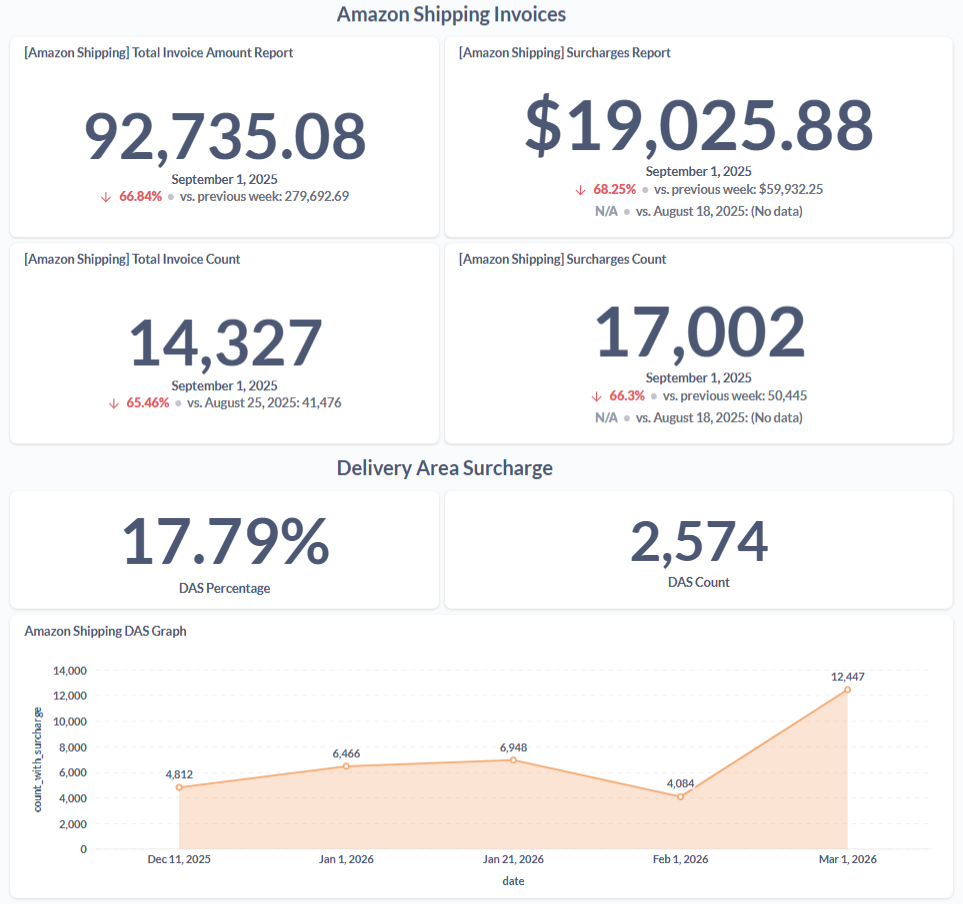
Automated Shipping Analytics
Built reporting views for invoice monitoring, shipping cost tracking, surcharge analysis, and weekly cost movement.
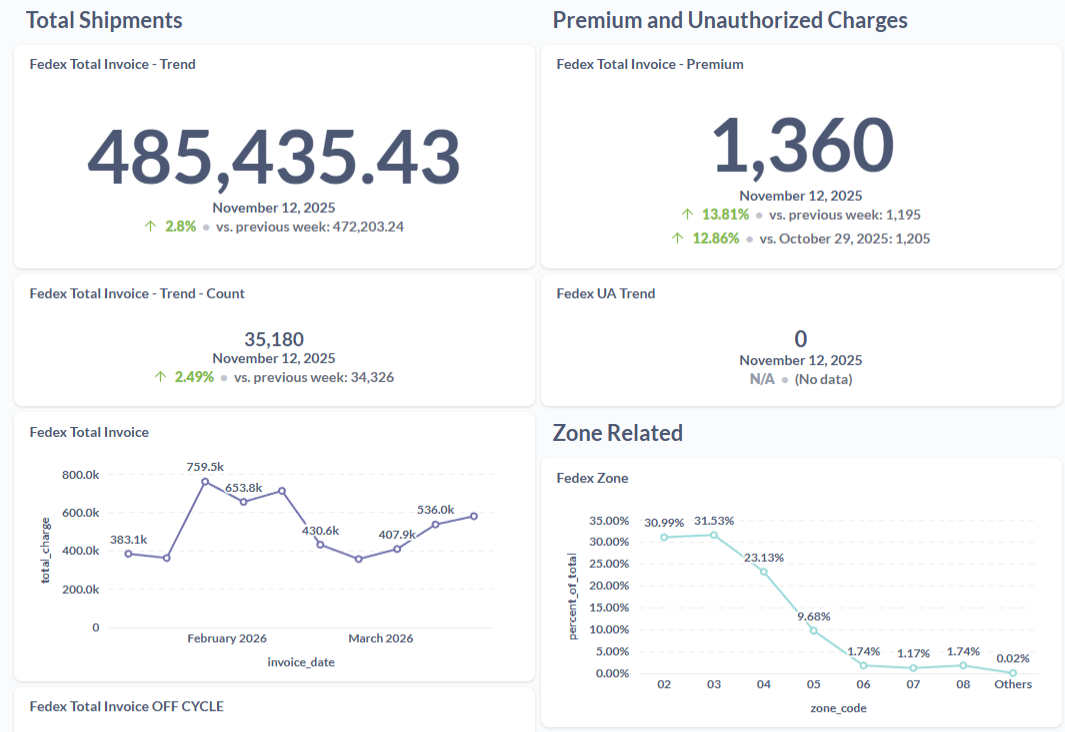
Surcharge Trends & Forecasting
Analyzed delivery surcharges, seasonal patterns, and operational cost drivers to support better shipping decisions.
Excel Automation
Automated repetitive reporting tasks using VBA, Python, pandas, and OpenPyXL.
Database Reporting
Worked with SQL, PostgreSQL, ClickHouse, and Metabase for analytics workflows.
Pipeline Documentation
Documented workflows, pipeline steps, and report logic so technical and non-technical users can understand the process.
Live Data Pipeline Demo
Click the button to trigger a live data workflow from this website. The pipeline runs online, fetches weather API data, stores raw output in S3-compatible storage, processes it, and loads the result into MySQL. This project represents my current hands-on data engineering learning path while my core strength remains data analytics and automation.
One-Click Pipeline Refresh
Server-side cooldown is enabled: only one run is allowed every 1 hour to avoid spam and unnecessary GitHub Action runs.
1. Trigger
Website button sends a secured POST request.
2. Runner
GitHub Actions starts the online workflow.
3. API + S3
Live API response is saved as raw JSON.
4. MySQL
Processed rows are inserted into the database.
Latest processed
—
Latest rows shown
—
Next allowed run
—
Database Output
Latest 10 rows from weather_pipeline_results.
Recommended SQL backend logic: order by processed time descending and return only 10 records.
Not loaded yet.
| City | Temp | Humidity | Wind | Weather Code | Processed At |
|---|---|---|---|---|---|
| Loading latest 10 database rows... | |||||
View the Python Pipeline Files
Recruiters and technical reviewers can inspect the actual Python scripts behind the live weather pipeline. The comments are written in plain language so the workflow is easy to understand without losing professionalism.
Files shown:
API fetch • Raw storage • Transform & load
Fetch Weather
Tests the API connection and displays cleaned weather results.
import requests
from datetime import datetime, timezone


# ------------------------------------------------------------
# STEP 1: Define the locations we want to check.
# ------------------------------------------------------------
# Each item contains the city name plus its latitude and longitude.
# The weather API uses the coordinates to know exactly which place
# we are requesting weather data for.
LOCATIONS = [
    {
        "city": "Cavite",
        "latitude": 14.4791,
        "longitude": 120.8960
    },
    {
        "city": "Manila",
        "latitude": 14.5995,
        "longitude": 120.9842
    },
    {
        "city": "Tokyo",
        "latitude": 35.6762,
        "longitude": 139.6503
    }
]


def fetch_weather(city: str, latitude: float, longitude: float) -> dict:
    """
    Fetch the current weather for one location.

    In simple terms:
    - We send the city's coordinates to the Open-Meteo API.
    - The API returns the latest weather details.
    - We extract only the fields we need for reporting.
    """
    # STEP 2: Set the API endpoint.
    # This is the web address where Open-Meteo receives weather requests.
    url = "https://api.open-meteo.com/v1/forecast"

    # STEP 3: Prepare the request parameters.
    # These tell the API which location to check and which weather fields
    # we want to receive.
    params = {
        "latitude": latitude,
        "longitude": longitude,
        "current": ",".join([
            "temperature_2m",
            "relative_humidity_2m",
            "wind_speed_10m",
            "wind_direction_10m",
            "weather_code"
        ]),
        "timezone": "Asia/Manila"
    }

    # STEP 4: Call the weather API.
    # timeout=30 prevents the script from waiting forever if the API is slow.
    response = requests.get(url, params=params, timeout=30)

    # STEP 5: Stop the script if the API returns an error.
    # This makes failures visible instead of silently using bad or empty data.
    response.raise_for_status()

    # STEP 6: Convert the API response from JSON text into a Python dictionary.
    data = response.json()

    # The "current" section contains the latest weather values.
    current = data.get("current", {})

    # STEP 7: Return a clean and simple dictionary.
    # This makes the output easier to read, print, or reuse in another script.
    return {
        "city": city,
        "latitude": latitude,
        "longitude": longitude,
        "temperature": current.get("temperature_2m"),
        "humidity": current.get("relative_humidity_2m"),
        "wind_speed": current.get("wind_speed_10m"),
        "wind_direction": current.get("wind_direction_10m"),
        "weather_code": current.get("weather_code"),
        "source_api": "Open-Meteo",
        "fetched_at": datetime.now(timezone.utc).isoformat()
    }


def main():
    """
    Run the full fetch step for all configured locations.
    """
    # STEP 8: Store each city's result in one list.
    results = []

    # STEP 9: Loop through every city and fetch its weather data.
    for location in LOCATIONS:
        weather = fetch_weather(
            city=location["city"],
            latitude=location["latitude"],
            longitude=location["longitude"]
        )
        results.append(weather)

    # STEP 10: Print the results so we can confirm the script worked.
    print("Fetched weather data:")
    for row in results:
        print(row)


# This makes sure main() runs only when this file is executed directly.
# It prevents the script from running automatically if imported elsewhere.
if __name__ == "__main__":
    main()
Why Hire Me as a Data Analyst / Aspiring Data Engineer?
I combine practical analytics experience with automation skills, and I am actively growing into deeper data engineering work.
Practical Builder
I build useful reports, scripts, and pipeline demos that solve real workflow problems.
Analytics First
My strongest base is SQL, reporting, cleaning, and business-focused analysis.
Learning Data Engineering
I am expanding from analytics automation into API pipelines, storage layers, transformations, and database loading.
Let’s Work Together
Looking for a Data Analyst or junior data engineering candidate who understands reporting, automation, SQL, and practical pipeline work? Send me a message and I’ll respond as soon as possible.